

Send the wrong technician to a rooftop unit and the job often needs a second visit, while the person who could have finished it alone was across town. Our technician skills matrix template puts each technician’s level on each skill in one grid, shows where you’re short of people who can work alone, and keeps every certification and license on a countdown to its expiry date.
Download the technician skills matrix template. It’s a plain .xlsx file with no macros and no sign-up. Replace the sample team with your own, and the coverage, gaps, expiry flags and training counts recalculate.
Video walkthrough
This short captioned walkthrough goes from the skill grid to the certification tracker and the training plan, then shows the Dashboard counts and ends on this page’s address.
Who this template is for
We built it for service companies with anywhere from a few technicians to a hundred, where the owner, service manager or dispatcher keeps track of who can do what. The sample trade is HVAC, so the eight skills are residential AC, gas furnaces, heat pumps, commercial rooftop units, refrigeration, controls and thermostats, ductless mini-splits, and the customer handoff at the end of a job. Plumbing, electrical and other trades can rename the skills to fit their work.
The workbook answers four questions:
- For each skill, how many technicians can do the job without help, and is that enough?
- Where is each technician strong, and where do they need training?
- Which certifications and licenses have expired, and which expire soon?
- Which training items are still open, and which are past their due date?
If the idea is new to you, our glossary entry on the skills matrix covers how service teams use one.
What’s in the workbook
There are six sheets, in this order:
- Instructions covers the level scale, the setup steps, the color legend and the limitations, plus a note that every formula, layout choice and sample figure was written from scratch for this file.
- Technicians is the register: a Tech ID, name and role for each person. The other sheets use the Tech ID as the key.
- Skills Matrix has the eight skill names across row 1, the number of technicians you need on each skill in row 2, and the coverage count in row 3. Below that, each technician gets a row with a level from 0 to 4 on every skill, plus how many skills they handle at independent level and their average level.
- Certifications gets one row per certification or license, with its number, issued date and expiry date. The sheet works out Days to expiry and a Status.
- Training Plan gets one row per training item: the technician, the skill, the target level, a due date, and a status of Planned, In progress or Done.
- Dashboard holds the as-of date and the expiry warning window, the team totals, a Data check, and a coverage table with the gap on each skill.
Blue cells are for typing, yellow cells calculate, and green cells hold the headline results.
The 0 to 4 level scale
Every cell in the grid takes a whole number:
- 0: no training on this skill
- 1: trained
- 2: works with supervision
- 3: works independently
- 4: can train others
Coverage depends on the step from 2 to 3. You can dispatch a level 3 technician alone and expect the job closed out. A level 2 can do the work, but someone needs to check it. That’s why coverage only counts levels 3 and 4.
How to set it up
- If your spreadsheet app opens the file read-only, turn on editing so the formulas calculate.
- On Dashboard, set the as-of date and the expiry warning window. The sample warns 60 days ahead. The as-of date is typed in so the sample numbers stay put; once you start using the file for real, type
=TODAY()in that cell. - On Technicians, replace the sample team with yours. Keep every Tech ID unique. Employee numbers, initials and short codes all work.
- On Skills Matrix, rename the eight skills in row 1 to match your work. In row 2, set how many technicians you need at level 3 or above on each one.
- Rate each technician from row 4 down. Type 0 instead of leaving a skill blank, because a blank counts as missing.
- On Certifications and Training Plan, clear the sample rows and add your own. The Tech ID column is a dropdown that reads your Technicians list.
- Fix every Row check that isn’t OK, then confirm Data check on Dashboard reads OK.
Coverage versus need: where the gap shows up
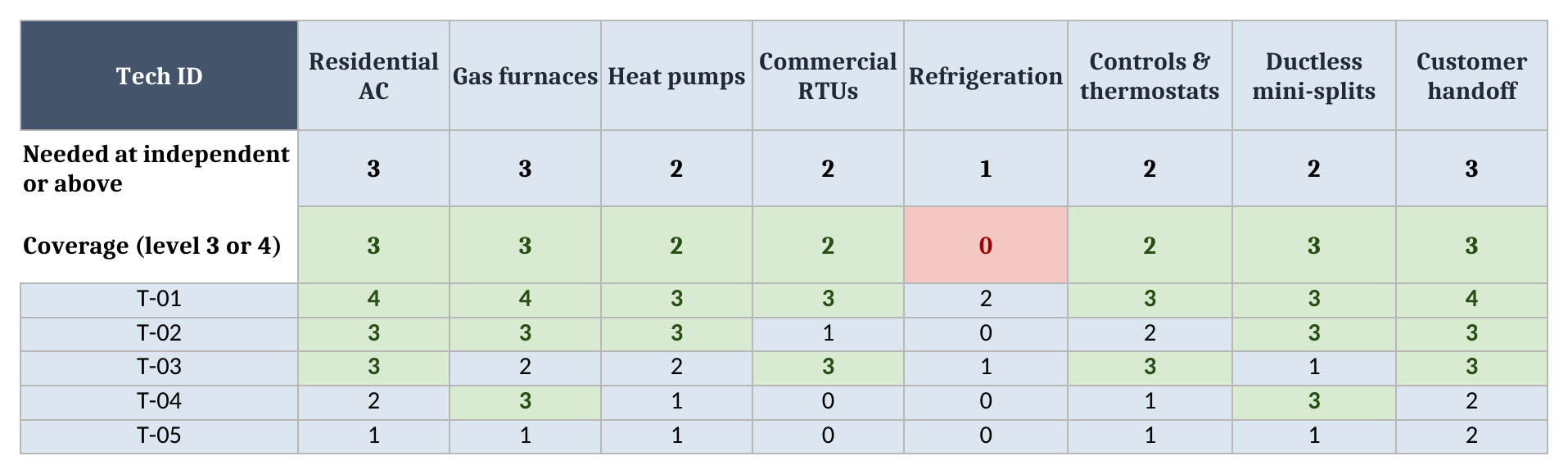
Row 2 on the Skills Matrix is your target, the number of technicians you want on each skill who can work it alone. Row 3 counts how many you have at level 3 or 4. When coverage falls below the target, the cell turns red, and the coverage table on Dashboard shows the shortfall as a gap.
The target is your call. A company that sells a lot of commercial rooftop work wants more than one person who can handle it, so a sick day doesn’t stall the schedule. A skill you rarely sell might need only one.
In the sample, refrigeration is the gap. The target is 1 and coverage is 0, because nobody on the team rates above a 2. Heat pumps sit exactly at target, with 2 technicians against a need of 2. Ductless mini-splits have room to spare: 3 against 2.
Closing a gap takes one edit. Dana Ruiz (T-01) is at level 2 on refrigeration, with a training item to reach level 3 by 2026-12-01. When Dana gets there, change that one cell from 2 to 3. Refrigeration coverage goes to 1, the gap closes, and the Dashboard’s count of skills with a gap drops to zero, with no other edits.
Reading across a row helps too. Dana handles 7 of the eight skills at independent level, with an average of 3.3. Ana Silva (T-05), the apprentice, handles 0 so far and averages 0.9, which is why most of the training plan points at Ana.
Tracking certifications and licenses
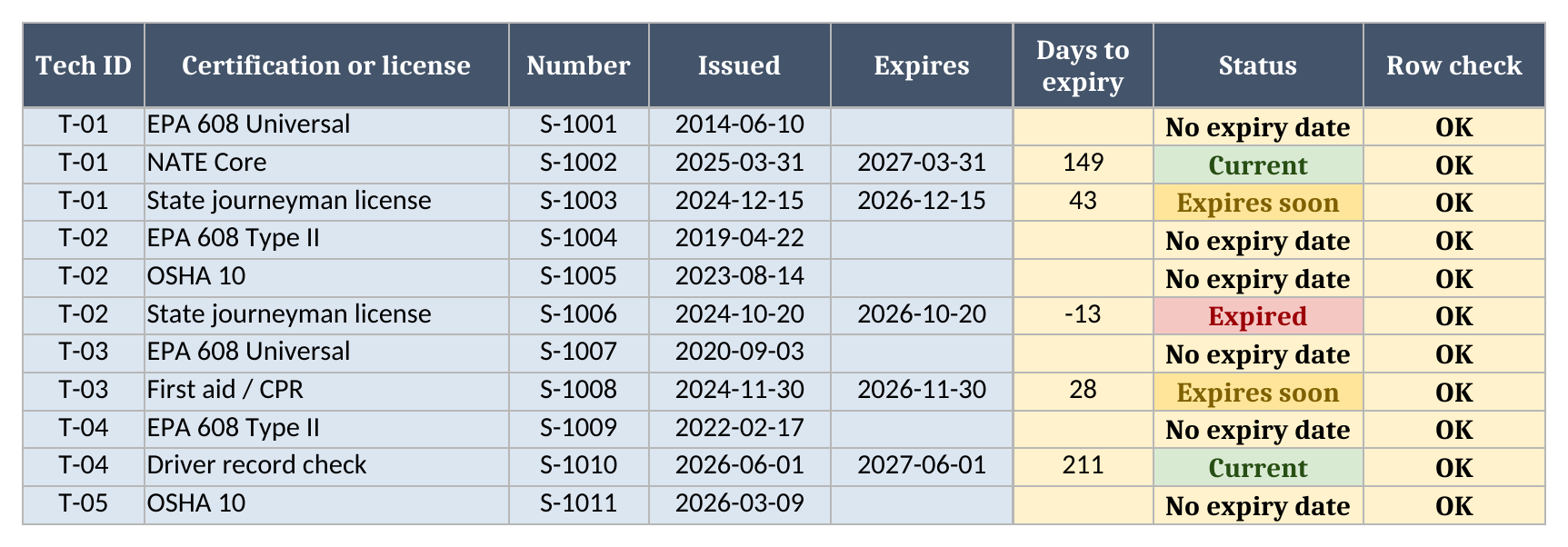
Certifications is the tracker for credentials that lapse. Each row names the technician, the credential and its number, the date it was issued and the date it expires. Days to expiry counts from the as-of date on Dashboard, and Status reads:
- Expired when the count is below zero
- Expires soon when it’s at or under the warning window you set
- Current when it’s further out than that
- No expiry date when the Expires cell is blank
A blank expiry date means nobody entered one. It doesn’t mean the credential never lapses, so check the card or the issuing body when you fill it in. The sample uses generic names such as EPA 608, NATE Core, OSHA 10 and a state journeyman license to show the layout. Which credentials your work calls for, and how each one renews, depends on your trade and your state, and the template leaves that to you.
In the sample, Marco Chen’s (T-02) state journeyman license shows -13 days to expiry, so it reads Expired. Dana’s license has 43 days left and Priya Nair’s (T-03) first aid and CPR card has 28. Both fall inside the 60-day window, so both read Expires soon. Dana’s NATE Core has 149 days left and reads Current.
Set the warning window to match how long a renewal takes you. If a renewal means booking a class and waiting on paperwork, give yourself more than a few weeks.
The training plan
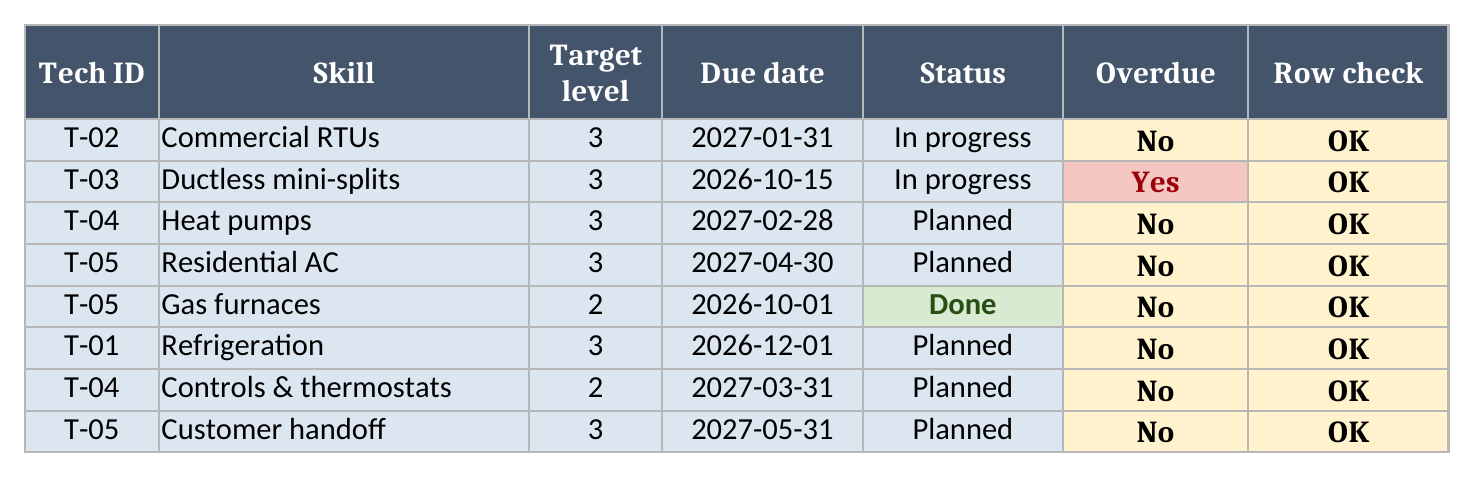
Training Plan lists the work that will move the matrix. Each row names the technician, the skill (typed exactly as it appears in row 1 of the Skills Matrix), the target level, a due date and a status. Overdue reads Yes when an item isn’t Done and its due date is before the as-of date.
The sample has 7 open items, and 1 of them is overdue: Priya’s ductless mini-split training was due 2026-10-15 and is still In progress.
Marking an item Done leaves the matrix alone on purpose, because a level should go up once someone has watched the technician do the work. When you’re satisfied, raise the level on the Skills Matrix yourself and coverage updates from there.
Using the matrix for dispatch
When a call comes in, the column for that skill shows who can take it alone, so send a level 3 or 4. If the job is a good chance to learn, send a level 2 along with them and log it against that person’s training item. Credentials matter at dispatch too: some work calls for a particular certification, and our glossary entry on technician skills certification explains what those credentials cover and why service companies track them.
Worked example from the sample data
The sample team has 5 technicians and 11 certifications, with an as-of date of 2026-11-02. All of it is made up. Here’s what the Dashboard shows:
| Metric | Result |
|---|---|
| Technicians | 5 |
| Average skill level | 2.0 |
| Skills with a coverage gap | 1 |
| Coverage gap (tech-skill slots short) | 1 |
| Certifications tracked | 11 |
| Expired | 1 |
| Expires soon | 2 |
| Training items open | 7 |
| Training overdue | 1 |
Under those figures, the coverage table lists each skill with its target, its coverage and the gap. In the sample, refrigeration is the only skill that’s short, by 1.
Average skill level is every level on the grid averaged together. It gives a rough sense of the team’s depth and moves whenever anyone is trained up, but the coverage gap is the number to act on.
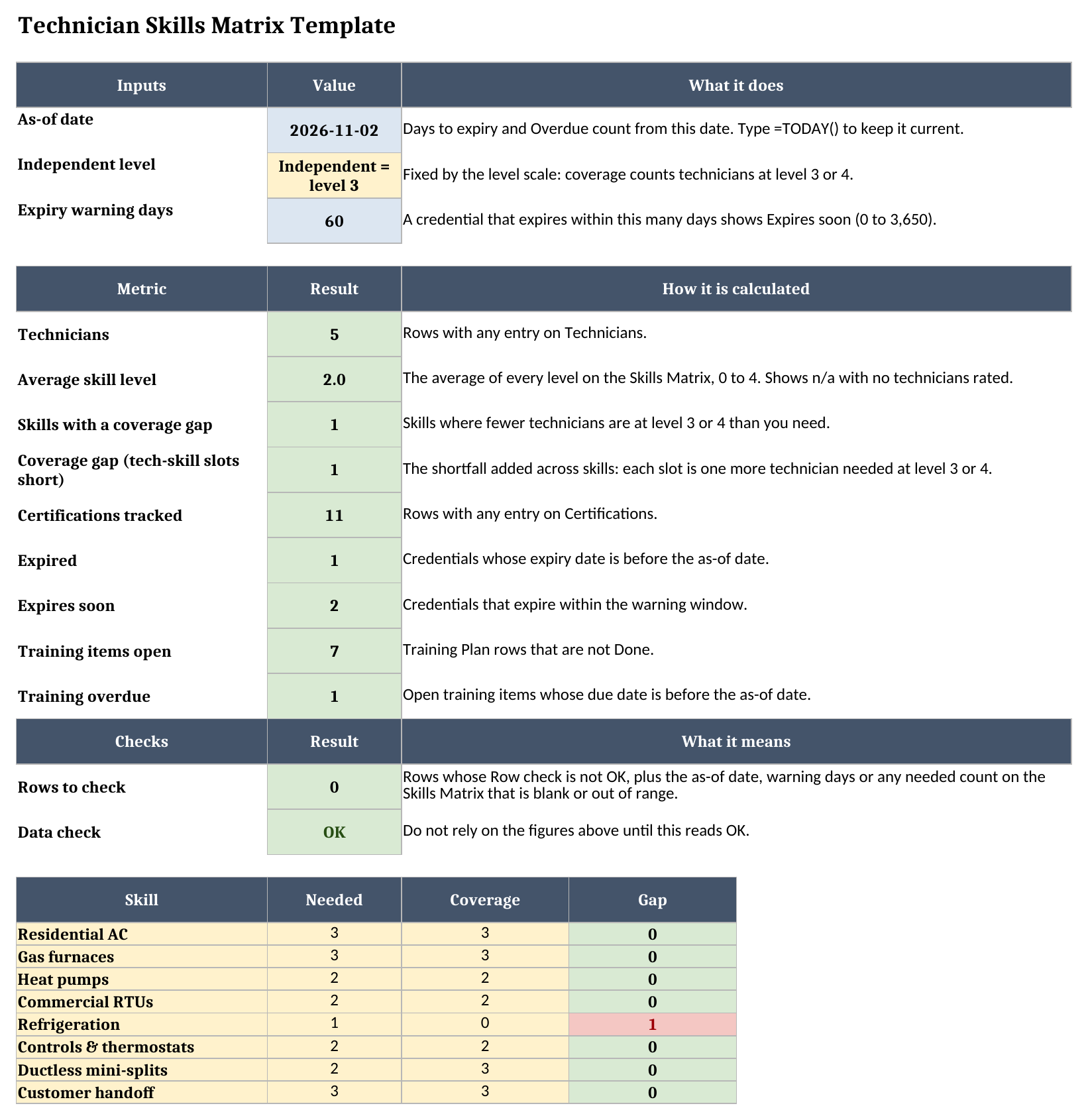
When a row has a problem, its Row check says so. That covers a Tech ID that isn’t on Technicians, a level outside 0 to 4, a training skill that doesn’t match a header, or a date that isn’t a date. The Dashboard figures then read Check data until it’s fixed. Rows to check counts them, and in the sample it’s 0.
How it fits with the HVAC employee handbook
Our HVAC employee handbook template sets out the policies your technicians work under, and its onboarding section includes a review of safety training and certifications. This workbook is where that record lives after the first week: who holds what, when it expires, and what each person is training toward. Use the handbook when you hire and the matrix every week after.
More free templates for running a service business are on the field service templates page.
Limitations to know before relying on it
- Levels are whatever you type. The workbook doesn’t test anyone or verify a credential.
- It won’t send a reminder when a credential is close to expiring. Someone has to open the file.
- Renewal rules, continuing education and which credentials a job or state requires aren’t modeled.
- The grid has eight skill columns. You can rename them to fit your work, but a ninth column wouldn’t be counted.
- It holds up to 100 technicians and 500 rows each on Certifications and Training Plan. Formulas and dropdowns stop at row 101 on Technicians, row 103 on the Skills Matrix and row 501 on the other two.
- A blank, duplicated or unlisted Tech ID, a level outside 0 to 4, an unmatched skill name or a date that isn’t a date shows up in Row check, and the Dashboard figures read Check data until Data check reads OK.
- It’s one file, and copies that two people edit separately will drift apart.
When you want dispatch to pick technicians by skill on its own, or to check credentials against a job before it’s assigned, that’s when field service software with skills-based scheduling is worth a look.
Until then, grab the technician skills matrix template, rate your team, and see where the gaps are.