

When a go-live date slips, the cause is often the data or a cutover task: the equipment records weren’t validated in time, or nobody owned freezing data entry in the old system. Our field service software implementation checklist tracks those two things in one file: a data migration map for every kind of record you’re moving, and a cutover checklist with owners, due dates and the gate tasks you won’t go live without. A Dashboard rolls both into a readiness score and a go/no-go against your own gates.
Download the field service software implementation checklist. It’s a plain .xlsx file with no macros and no sign-up. Replace the sample rows with your own objects and tasks, and the progress, readiness and go/no-go recalculate.
Video walkthrough
This short captioned walkthrough goes through the Migration Map’s record-weighted progress, the overdue, blocked and gate tasks on the Go-Live Checklist, and the go/no-go on the Dashboard.
Who this template is for
We built it for service companies moving off spreadsheets, paper or an older system onto new field service software, usually in the last month or two before go-live. It’s meant for whoever is running the switch, often an owner, an operations manager or an office manager who also has a day job.
It answers four questions:
- Which records are we moving, who owns each one, and how far along is each?
- Which cutover tasks are late, blocked or still open?
- Which tasks have to be done before we switch, and are they done?
- Are we ready to go live on the date we picked?
If you’re still choosing a date, our implementation timeline works backward from a go-live date to a week-by-week plan, and the switching-cost calculator puts a figure on the migration, retraining and overlap months. This checklist picks up once the date is set.
What’s in the workbook
There are four sheets, in this order:
- Instructions covers setup, the color legend, the limitations and a note that every formula, layout choice and sample figure was written from scratch for this file.
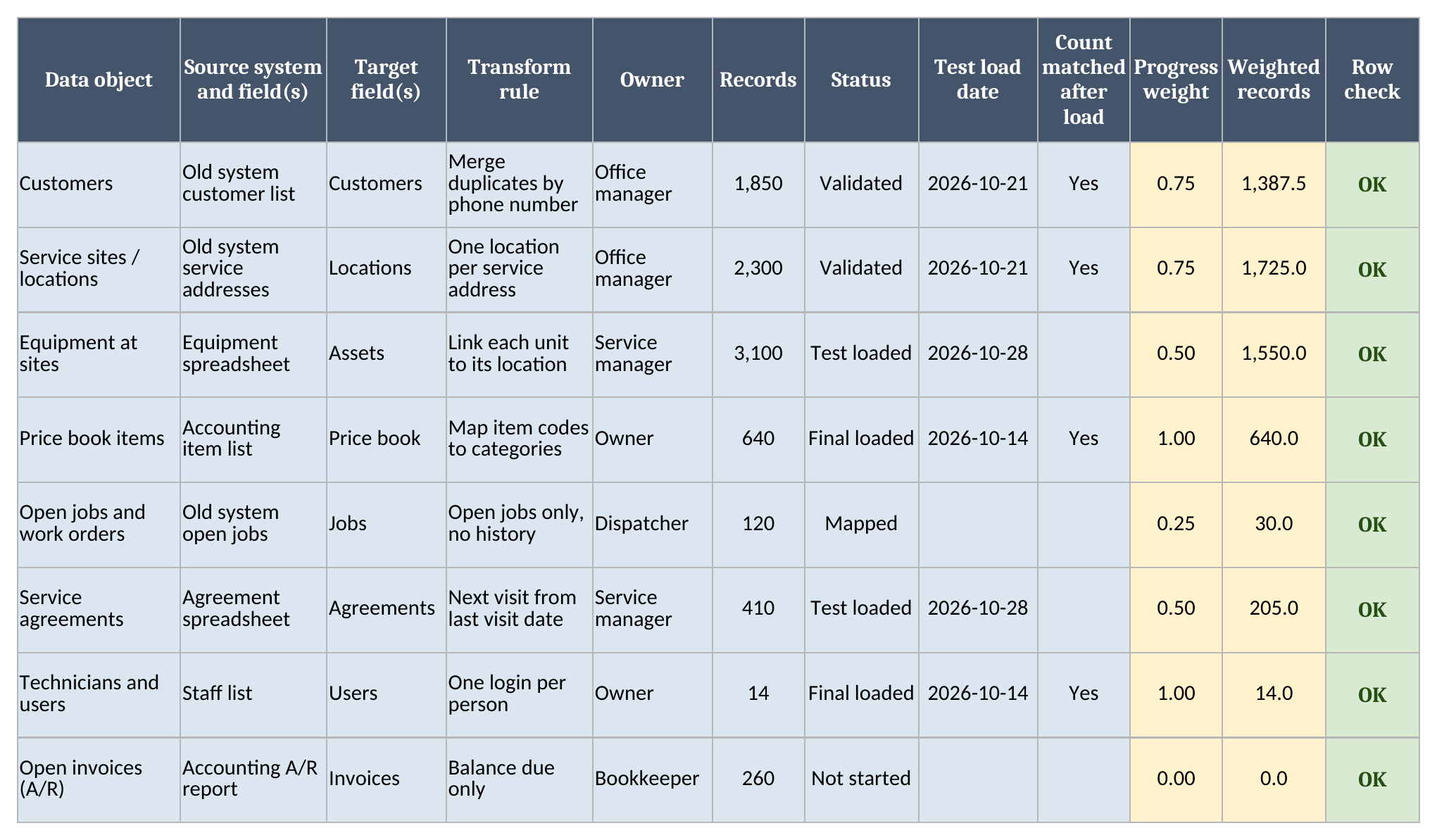
- Migration Map has one row per data object: customers, service locations, equipment, the price book, open jobs, agreements, users, open invoices and anything else you’re moving. You type the source system and fields, the target fields, the transform rule, an owner, the record count and a status, plus the test load date and whether the counts matched after the load. The sheet works out a progress weight, the weighted records and a Row check.
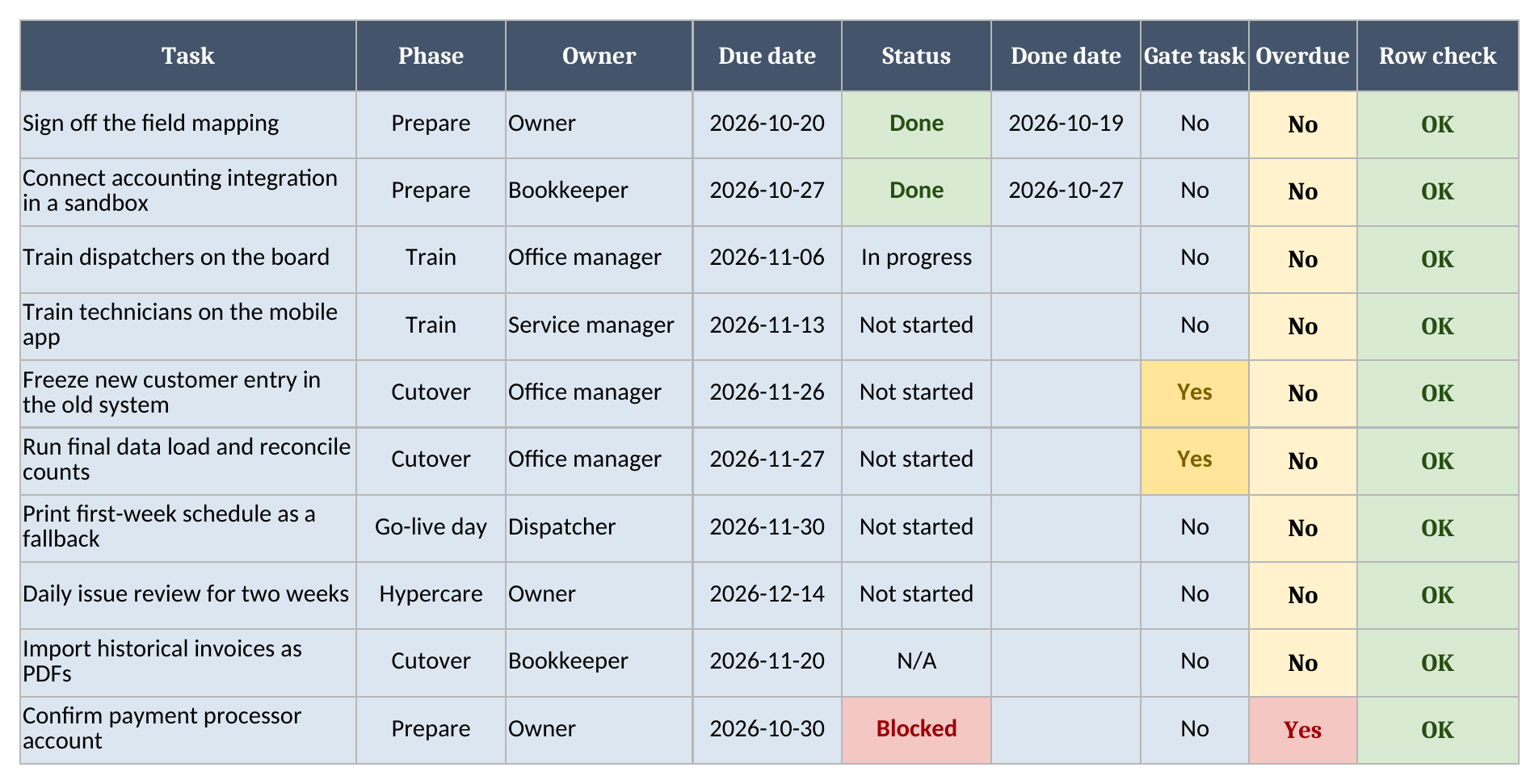
- Go-Live Checklist has one row per cutover task, with a phase, owner, due date, status, done date and a Gate task flag. The sheet marks each task Overdue or not against the Dashboard’s as-of date, and checks the row.
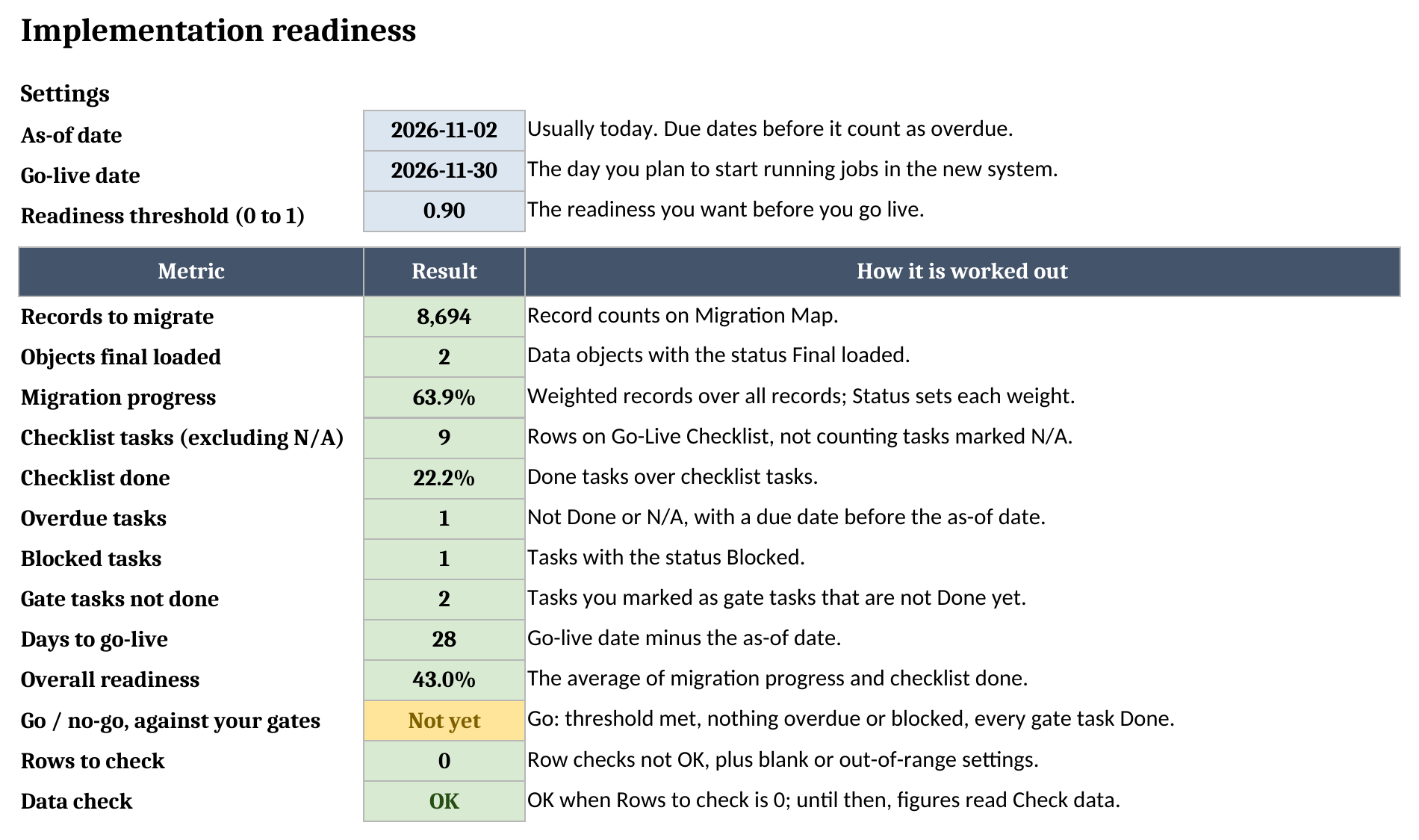
- Dashboard holds your as-of date, go-live date and readiness threshold, then records to migrate, migration progress, checklist completion, overdue, blocked and open gate tasks, days to go-live, overall readiness and the go/no-go.
Blue cells are for typing, yellow cells calculate, and green cells hold the headline results.
How to set it up
- If your spreadsheet app opens the file read-only, turn on editing so the formulas calculate.
- On Dashboard, set the as-of date (usually today), the go-live date and a readiness threshold between 0 and 1. The sample uses 0.9, which means 90%.
- On Migration Map, list each kind of record you’re moving, one row each. Pull the record count from the old system, not from memory, because that count is what you’ll check against after every load.
- Fill in the source and target fields and the transform rule as you map each object. A transform rule is anything that changes the data on the way across, such as merging duplicate customers or loading open jobs only.
- Move each object’s status along as it goes: Not started, Mapped, Test loaded, Validated, Final loaded. After a load, type the date, and pick Yes in Count matched once the count in the new system matches the old one.
- On Go-Live Checklist, list the tasks between now and go-live. Give every task an owner and a due date, and mark the few you won’t cut over without as gate tasks.
- Fix any Row check that isn’t OK, then confirm Data check on Dashboard reads OK.
Our guide to field service data migration covers what each kind of record involves and the order they usually move in.
How migration progress is weighted
Counting finished objects would treat a 14-row users list the same as 3,100 equipment records. Instead, each object’s status sets a weight, and the weight is applied to its record count:
| Status | Weight |
|---|---|
| Not started | 0 |
| Mapped | 0.25 |
| Test loaded | 0.5 |
| Validated | 0.75 |
| Final loaded | 1 |
Weighted records is the record count times the weight, and migration progress is the weighted records over all records. In the sample, the 3,100 equipment records are test-loaded, so they count as 1,550 weighted records. The 14 user accounts are final-loaded and count as 14. Finishing the users list moves the score by a fraction of a point, while validating the equipment would move it by several points.
Validated means you checked the records after a test load, and the sheet holds you to that. An object marked Validated or Final loaded needs Yes in Count matched, or its Row check reads Check counts. An object marked Mapped or later needs its source and target fields filled in, or its Row check reads Map fields.
Gate tasks and the go/no-go
Most checklist tasks can slip a few days without stopping go-live, but some have to be finished before you switch. Freezing new customer entry in the old system and running the final data load are the two in the sample. Mark those as gate tasks.
Overall readiness is the average of migration progress and checklist done, where checklist done leaves out tasks marked N/A. The go/no-go reads Go only when all four of these hold:
- readiness meets your threshold
- no task is overdue
- no task is blocked
- every gate task is Done
Otherwise it reads Not yet. It reports what your own plan says, so it can’t approve the switch for anyone else or tell you whether you picked the right gates.
Worked example from the sample data
The sample has 8 data objects and 10 cutover tasks, with an as-of date of 2026-11-02 and go-live on 2026-11-30. All of it is made up. Here’s the Migration Map:
| Data object | Records | Status | Weighted records |
|---|---|---|---|
| Customers | 1,850 | Validated | 1,387.5 |
| Service sites / locations | 2,300 | Validated | 1,725 |
| Equipment at sites | 3,100 | Test loaded | 1,550 |
| Price book items | 640 | Final loaded | 640 |
| Open jobs and work orders | 120 | Mapped | 30 |
| Service agreements | 410 | Test loaded | 205 |
| Technicians and users | 14 | Final loaded | 14 |
| Open invoices (A/R) | 260 | Not started | 0 |
On the checklist, two tasks are Done, one is In progress, one is Blocked, one is N/A and the rest haven’t started. The blocked task, confirming the payment processor account, was due on 2026-10-30, so it’s also overdue.
Here’s the Dashboard:
| Metric | Result |
|---|---|
| Records to migrate | 8,694 |
| Objects final loaded | 2 |
| Migration progress | 63.9% |
| Checklist tasks (excluding N/A) | 9 |
| Checklist done | 22.2% |
| Overdue tasks | 1 |
| Blocked tasks | 1 |
| Gate tasks not done | 2 |
| Days to go-live | 28 |
| Overall readiness | 43.0% |
| Go / no-go | Not yet |
With 28 days left, readiness is 43.0% against a threshold of 90%. Clearing the blocked task fixes the overdue count too, but the go/no-go still reads Not yet, because both gate tasks are open and readiness is well short. Even with the threshold set to 0, it stays Not yet until those two gate tasks are Done.
How it differs from a rollout plan
A rollout plan sets out the phases, the training and the parallel run, when the old and new systems run side by side. Our field service software rollout plan covers those. This checklist tracks the two parts that decide whether the go-live date holds: getting the data across and finishing the cutover tasks. For the wider sequence from choosing software to go-live, our FSM implementation guide walks through the steps.
Limitations to know before relying on it
- Weights follow status and record count only. The sheet doesn’t know that one object is harder to move than another of the same size.
- Count matched is your own check after each load. The workbook doesn’t connect to either system or compare them for you.
- The go/no-go summarizes your threshold and gate tasks. It doesn’t approve anything, and it’s only as good as the gates you pick.
- A row with a blank object, owner, task or due date, a record count that isn’t a whole number from 0 to 10,000,000, a status or flag outside its list, a Done task with no done date, or a gate task marked N/A shows a warning in Row check. A blank or out-of-range setting on Dashboard counts too. Every Dashboard figure except Objects final loaded and Checklist tasks then reads Check data until Data check reads OK.
- Phases, training plans and a parallel run aren’t covered. The phase column is a label for sorting tasks.
- The workbook holds up to 200 data objects and 300 tasks. Formulas and dropdowns stop at row 201 on Migration Map and row 301 on Go-Live Checklist.
- It’s one file. It doesn’t send reminders or sync between the people who own the tasks.
The rest of the set is on the free field service templates page.
Grab the field service software implementation checklist, list the records you’re moving, and mark your gate tasks before the date gets close.