

It’s easy to price a maintenance agreement from what the last building paid, add a bit for the extra rooftop unit, and send the number. A year later it’s hard to say whether that agreement made money. Our HVAC maintenance agreement pricing template starts from what the agreement costs you to deliver: each unit and visit, the drive out, the filters and belts, and your overhead. Then it prices that cost at the margin you choose.
Download the HVAC maintenance agreement pricing template. It’s a plain .xlsx file with no macros and no sign-up. Replace the sample equipment, hours and rates with your own, and the annual, monthly and per-visit prices recalculate.
Video walkthrough
This short captioned walkthrough goes from the equipment list to the equipment types, then shows the Price sheet turning the annual cost into a price at your margin.
Who this template is for
It’s for commercial HVAC contractors and the service managers who quote planned maintenance: rooftop units, split systems, boilers, exhaust fans and make-up air units on offices, schools, clinics and retail sites. It suits a shop that prices each agreement from the equipment on site, rather than from a flat rate per ton or per building.
The workbook answers four questions for one agreement at a time:
- How many labor hours and how much material does this equipment list need in a year?
- How many trips to the site does that take?
- What does the agreement cost us in total, once overhead is in?
- What do we charge per year, per month and per visit to keep our margin?
The fifth sheet keeps track of the agreements you’ve already sold and flags the ones coming up for renewal.
What’s in the workbook
There are five sheets, in this order:
- Instructions covers setup, the colour legend, how to import the file into a browser-based spreadsheet app, the limitations, and a note that every formula, layout choice and sample figure was written from scratch for this file.
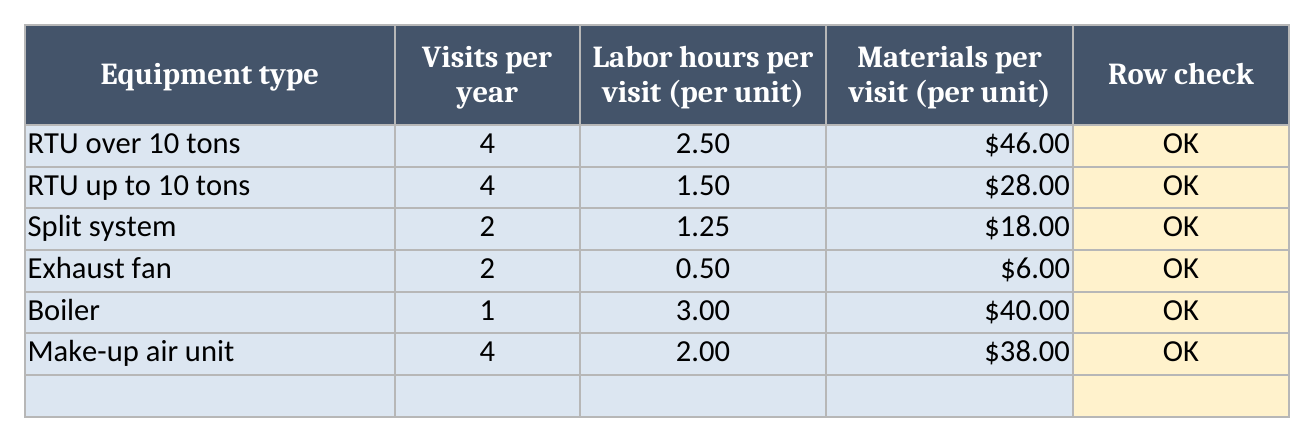
- Types lists the kinds of equipment you service. Each type has visits per year, labor hours per visit for one unit, and materials per visit for one unit. It holds 30 types.
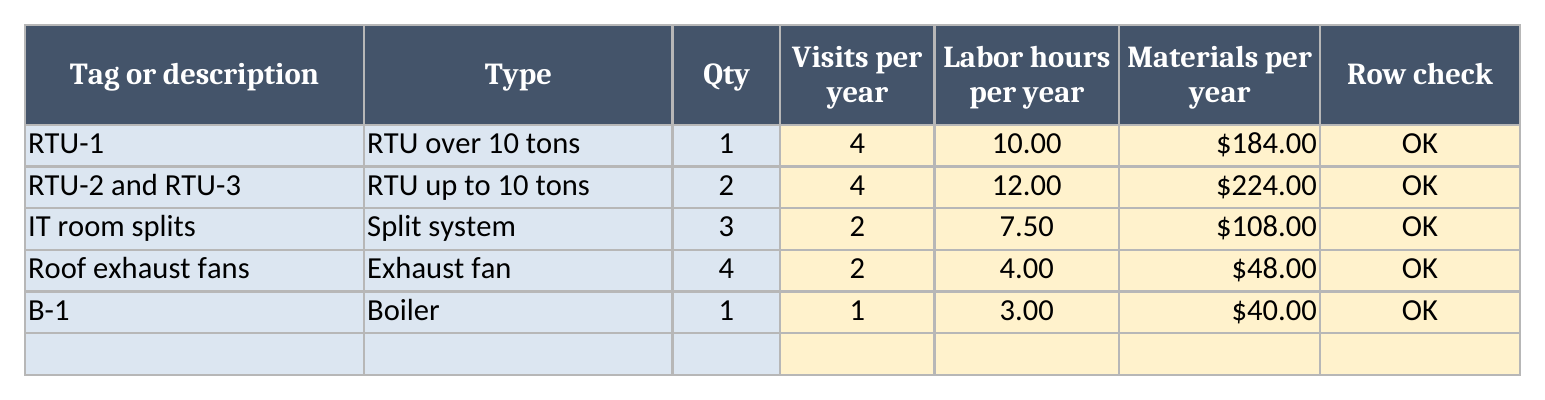
- Equipment is the list of units on this one agreement: a tag or description, the type (picked from a dropdown fed by Types) and the quantity. The sheet looks up the visits and works out labor hours and materials per year for each row. It holds 100 rows.
- Price holds your rates and builds the price: labor hours, site visits, labor cost, materials, trips, direct cost, overhead, total annual cost, then the annual, monthly and per-visit price, the annual margin and how many extra visits that margin covers. Below that sits the renewal summary.
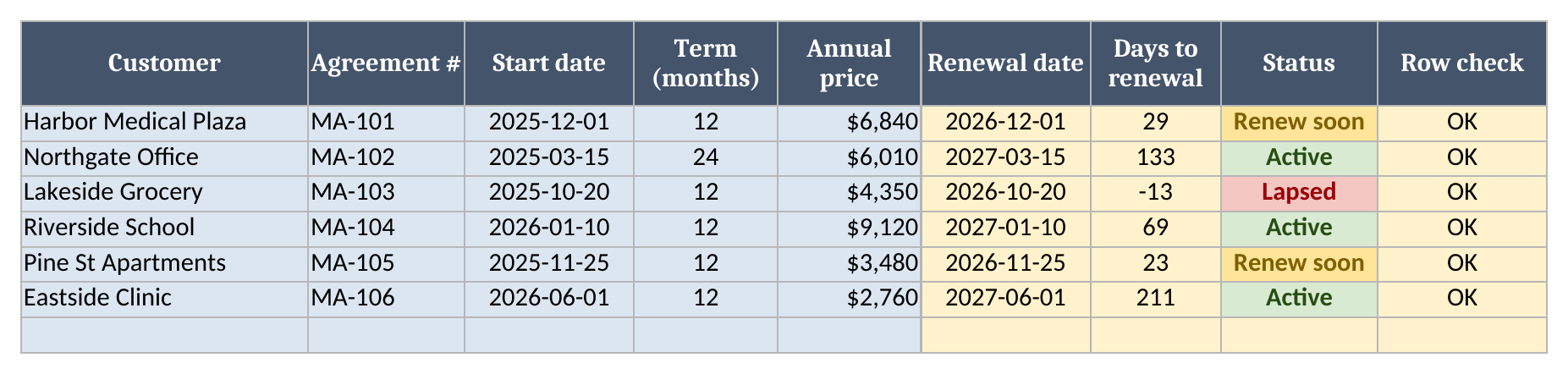
- Renewals is a list of your agreements with start dates, terms and annual prices. It works out each renewal date and marks it Active, Renew soon or Lapsed. It holds 200 agreements.
Blue cells are for typing, yellow cells calculate, and green cells hold the headline results. Every rate, hour and price in the file is a sample input for you to replace. None of them is a market rate.
How to set it up
- If your spreadsheet app opens the file read-only, turn on editing so the formulas calculate.
- On Types, replace the sample rows with the equipment you service. Use your own numbers for visits per year, hours per unit per visit and materials per unit per visit. Your service records and your own checklists are the best source.
- On Equipment, list every unit the agreement covers. Pick each type from the dropdown and enter the quantity. If a type isn’t in the list, add it on Types first.
- On Price, enter your loaded labor cost per hour, the round-trip drive time per site visit, the trip cost per visit, overhead as a share of direct cost, and your target margin.
- Check Rows to check on Price. It must read 0 before the price shows. Anything else means a Row check on Types or Equipment, or one of the rates, needs fixing.
Building the cost: units, visits and trips
The Types sheet carries the per-unit numbers, so each type only has to be set once. A large rooftop unit in the sample takes 2.5 hours a visit, four times a year, with $46 of filters and belts each time. A split system takes 1.25 hours twice a year. Equipment then multiplies those by the quantity on the agreement. Three split systems at two visits each come to 7.5 labor hours a year.
Drive time and trip cost are counted per trip. A technician drives out once and services every unit that’s due that day. So the workbook counts site visits as the highest visits-per-year among the units on the agreement, and charges drive time and trip cost per visit. The sample’s rooftop units are on four visits a year, the exhaust fans on two and the boiler on one, so the site gets 4 visits a year. The fans and the boiler ride along on visits the RTUs already need.
A row with a quantity of 0 sends no truck. If an agreement lists a unit you’re not servicing this year, its visits don’t count toward the trip total.
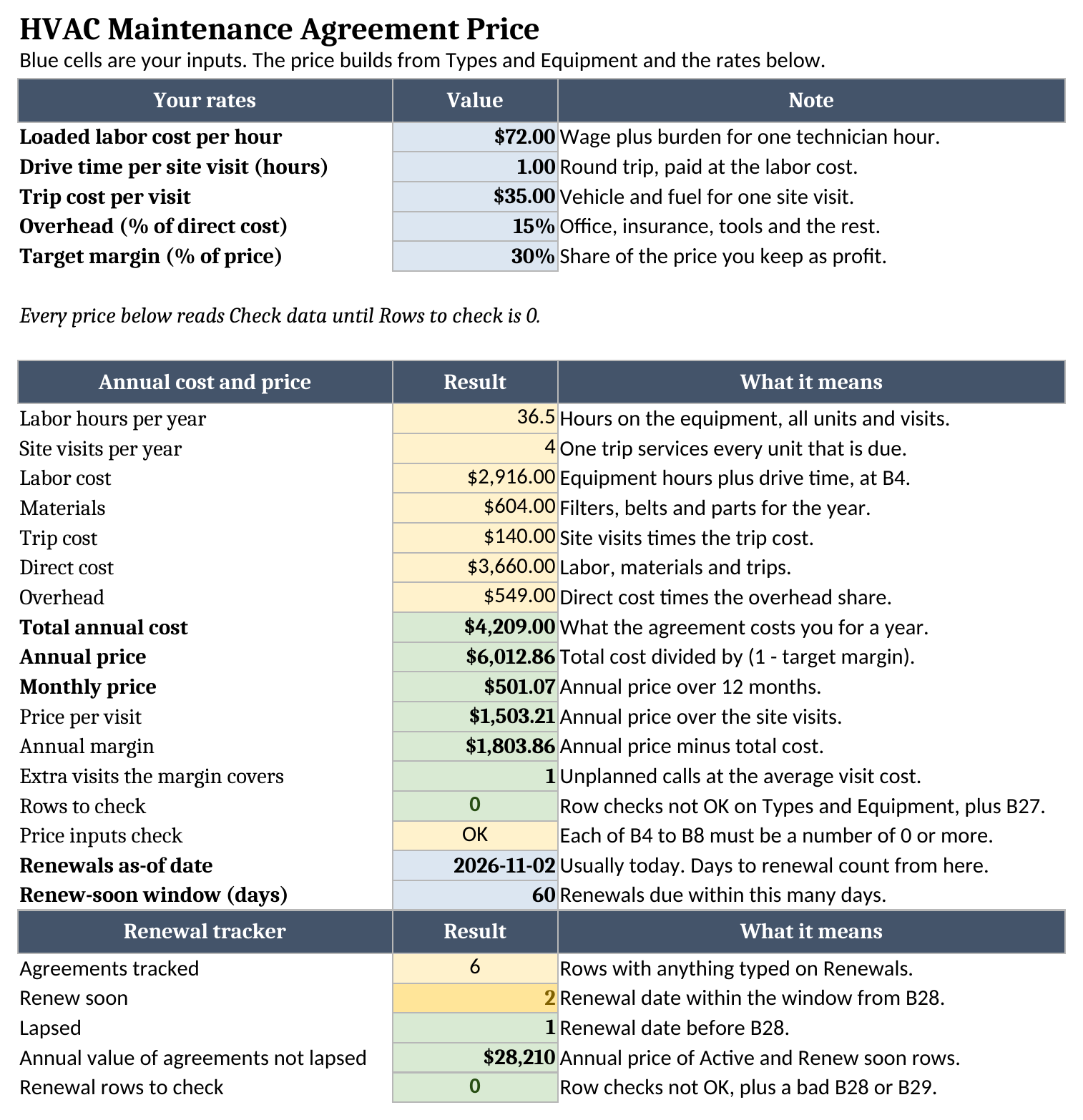
The sample totals 36.5 labor hours on the equipment, plus one hour of drive time for each of the 4 site visits. At the sample labor rate, that’s a labor cost of $2,916.00. Materials add $604.00 and trips add $140.00.
From cost to price at your margin
Labor, materials and trips make the direct cost of $3,660.00. Overhead goes on top as a share of that, $549.00 in the sample, for a total annual cost of $4,209.00.
The price comes from a margin on the price. A 30% target margin means 30% of the price is profit, so the price is the cost divided by 0.7. Adding 30% to cost instead (a markup) leaves a margin of about 23%. The workbook divides the total annual cost by one minus your target margin, then splits the result into a monthly price and a price per site visit.
The last line, extra visits the margin covers, is the one to read before you send the quote. It divides the annual margin by the average cost of one planned visit and rounds down. That’s roughly how many unplanned calls, callbacks or emergency trips the agreement can absorb in a year before it stops paying for itself. If it reads 0 or 1 on a site you know generates calls, the price is too thin.
Worked example from the sample data
The sample is one made-up commercial building with a large rooftop unit, two smaller RTUs, three IT room splits, four roof exhaust fans and a boiler, priced at the sample rates on the Price sheet. Here’s what it produces:
| Line | Per year |
|---|---|
| Labor hours on the equipment | 36.5 |
| Site visits | 4 |
| Labor cost, including drive time | $2,916.00 |
| Materials | $604.00 |
| Trip cost | $140.00 |
| Overhead | $549.00 |
| Total annual cost | $4,209.00 |
| Annual price | $6,012.86 |
| Monthly price | $501.07 |
| Price per site visit | $1,503.21 |
| Annual margin | $1,803.86 |
| Extra visits the margin covers | 1 |
At the sample rates, this agreement prices at $6,012.86 a year, or $501.07 a month. The margin of $1,803.86 covers 1 extra visit at the average visit cost before the year turns into a loss. Move the large rooftop unit to six visits a year and the site visits rise to six with it, because that unit now sets the trip count.
Tracking renewals
Renewals are easy to miss when nobody is watching the dates. The Renewals sheet lists each agreement with its start date, term in months and annual price. It works out the renewal date and the days left from the as-of date on Price, and marks the agreement Lapsed, Renew soon (inside the window you set, 60 days in the sample) or Active.
The sample tracks 6 agreements. 2 are due within the window, 1 has already lapsed, and the agreements still running are worth $28,210 a year. Set the as-of date to today each time you open the file, and the Renew soon count tells you who to call this week. When you price a renewal, run the building’s equipment back through the first three sheets with this year’s labor cost before you send the new number.
The agreement, the calculator and this workbook
This workbook sets the price. The terms, scope and sign-off belong in the agreement document itself. Our free commercial HVAC maintenance agreement template covers that part. For a quick number in the browser without a spreadsheet, the maintenance agreement price calculator runs the same math on a short equipment list. If you’re new to the terms, our glossary entry on the maintenance contract explains what these agreements usually include. More free tools for running the business are on our free field service templates page.
Using it in a browser-based spreadsheet app
The file is a standard .xlsx. If you work in a browser-based spreadsheet app, import the file rather than opening it from a preview. In most apps that’s File > Import, then upload the file. After importing, check that the Price sheet shows the same sample results before you replace the data.
Limitations to know before relying on it
- One copy prices one agreement. Save a copy per customer or per building.
- Site visits follow the busiest unit with a quantity above 0. If some equipment needs its own separate trips, such as a boiler serviced in a month when the cooling units aren’t due, don’t raise that unit’s visits, because that also multiplies its labor hours and materials. Instead, add a type such as “Site trips” on Types with 0 labor hours and 0 materials, set its visits per year to the total trips the site needs (4 rooftop visits plus 1 separate boiler trip makes 5), and list it once on Equipment with a quantity of 1. The trip count rises to match and the equipment hours stay the same.
- Drive time is one figure per site visit. A site with very different access from visit to visit needs an average.
- The workbook doesn’t schedule visits, split them across seasons, add sales tax, or price emergency calls.
- Overhead is one percentage of direct cost. If you allocate overhead per hour instead, fold it into the loaded labor cost and set overhead to 0.
- Renewal terms are whole months, and the tracker holds 200 agreements.
- Any Row check that isn’t OK, or a missing or negative rate, turns every price into Check data until you fix it. The renewal summary does the same with its own checks.
None of the sample figures is a benchmark. A labor rate, trip cost or margin from another shop tells you nothing about your own costs, so use your payroll, vehicle and job records for the inputs.
When the next quote request comes in, grab the HVAC maintenance agreement pricing template, list the equipment, and price it from your own numbers.