

A service visit produces a handful of facts that matter later: when the technician got there and left, what they measured, what they replaced, and what it all cost. Our field service report template puts those on one printable page. Type the arrival and departure times and it works out hours on site and labor. Type each reading with its limits and it flags anything outside them. Pick a part number and its price comes from your own parts catalog, so the report total builds itself.
Download the field service report template. It’s a plain .xlsx with no macros and no sign-up. It comes with a blank report to copy for each visit and a filled sample report you can check the math against.
Video walkthrough
This short captioned walkthrough covers the sample report, the parts catalog and the blank report.
Who this template is for
It’s for service teams that send a technician to a site and need a clean record of the visit without buying software yet: an owner-operator who writes up their own calls, an office manager who turns technicians’ notes into something the customer can sign, or a facilities team servicing its own equipment.
It answers four questions about a single visit:
- How long was the technician on site, and what does that come to in labor?
- Which readings were outside the limits they should be in?
- Which parts went in, and what did they cost?
- What does the customer owe, and did they sign off?
The sample is a refrigeration call, but the layout works as a general service report template for any trade. Swap the readings for voltages, flow rates or whatever your equipment needs.
What’s in the workbook
There are four sheets, in this order:
- Instructions covers setup, the color legend, Google Sheets import, the limitations, and a note that the formulas, layout and sample figures were written from scratch for this file.
- Report is the blank field service report form. It has the visit details, arrival and departure times, up to six readings, up to eight part lines, the totals, a box for work performed, a box for recommendations, and signature and date lines for the technician and the customer.
- Sample Report is the same report filled in for one visit, so you can see every calculation working before you use it.
- Parts is your catalog: part number, description and unit price for up to 100 parts. Both reports read their prices from it.
Blue cells are for typing, yellow cells calculate, and green cells are the totals.
How to fill in a report
- On Parts, replace the sample parts with your own. Each part needs a unique part number, a description and a unit price of 0 or more. Fix any Row check that doesn’t read OK.
- Duplicate the blank Report sheet for the visit (right-click its tab and copy the sheet). Keep the original blank as your master.
- Type the report number, date, customer, site, equipment and technician.
- Type the arrival and departure times, such as 8:15 and 11:45 (the cells show 24-hour time, so an afternoon departure reads 13:30), and any unpaid break in minutes.
- Type your labor rate per hour and the trip charge, if you charge one.
- For each reading, type its name, unit, min, max and the value measured.
- Under Parts used, pick each part number from the dropdown and type the quantity.
- Type the tax rate on parts, write up the work performed and your recommendations, then print the sheet for signatures.
Report total reads “Check data” while Rows to check is above 0.
How hours on site and labor work
Hours on site is the departure time minus the arrival time, less the unpaid break. It stays at 0 until both times are typed. Labor is hours on site times your labor rate.
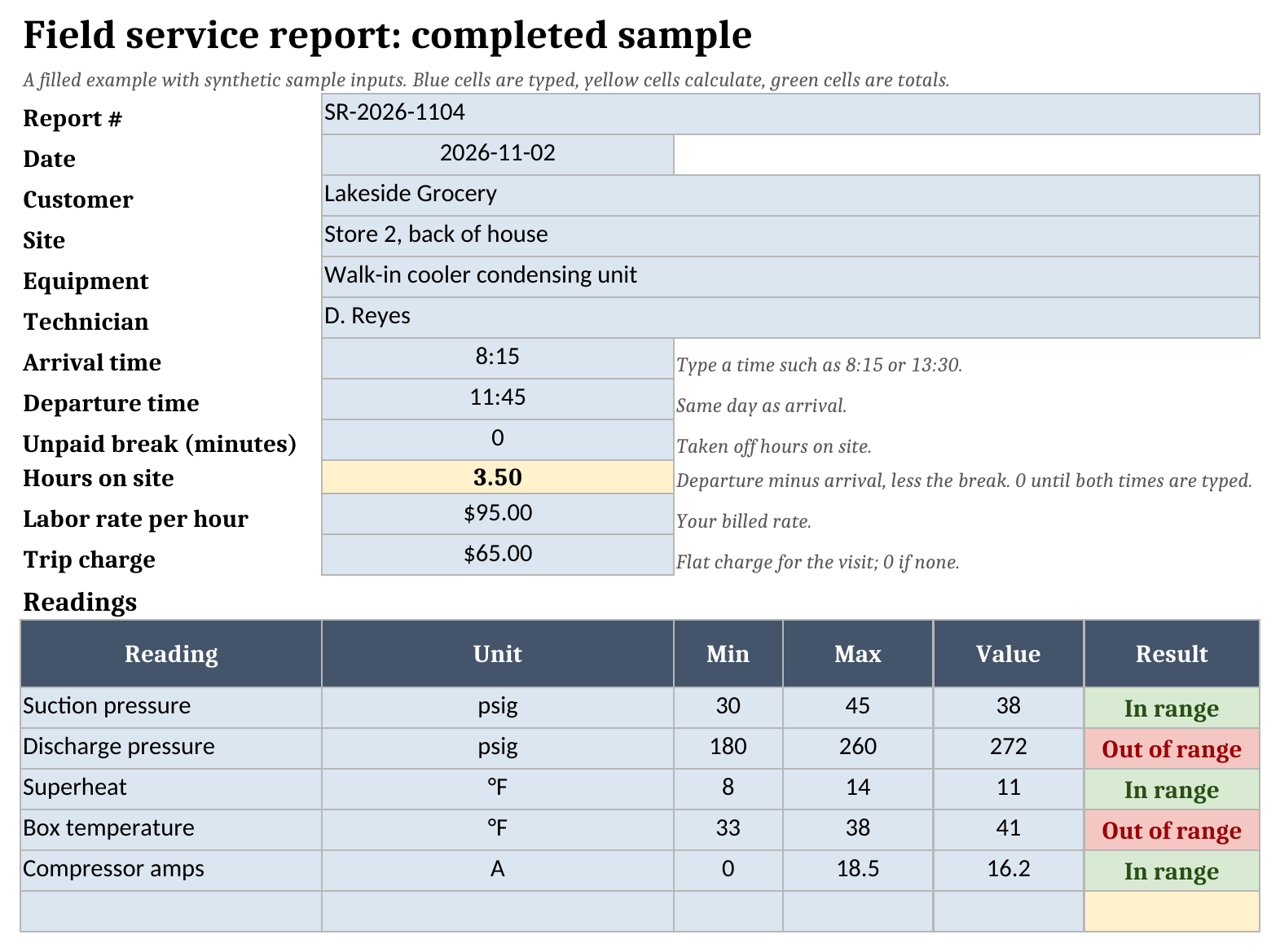
In the sample, the technician arrives at 8:15 AM and leaves at 11:45 AM with no break. That’s 3.5 hours on site. At the sample rate of $95 per hour, labor comes to $332.50. A 30-minute break typed in the break cell takes half an hour off hours on site, and labor follows.
The report covers one visit on one day. If the departure time is earlier than the arrival time, hours on site reads 0, so split an overnight job into two reports.
How readings are checked
Each reading row has a min, a max and the value you measured. Result reads In range when the value sits between them and Out of range when it falls below the min or above the max. Readings out of range at the bottom of the report counts them.
Two of the five sample readings are out of range. Discharge pressure is 272 psig against a max of 260, and box temperature is 41 °F against a max of 38, so Readings out of range shows 2. The other three, suction pressure, superheat and compressor amps, are in range.
Leave the min blank to check only the max, or the max blank to check only the min. With both blank, the value is recorded and not checked. A min above the max reads Check limits, text in a limit reads Check limits, and text in the value reads Check value. Each of those adds one to Rows to check.
The limits in the sample are placeholders that show how the check works. Use the ranges from the equipment manufacturer or your own service standards.
Parts priced from your catalog
Pick a part number on a report and the line fills in that part’s description and unit price from the Parts sheet. Type the quantity and the line total follows. Parts on the report is the sum of the line totals.
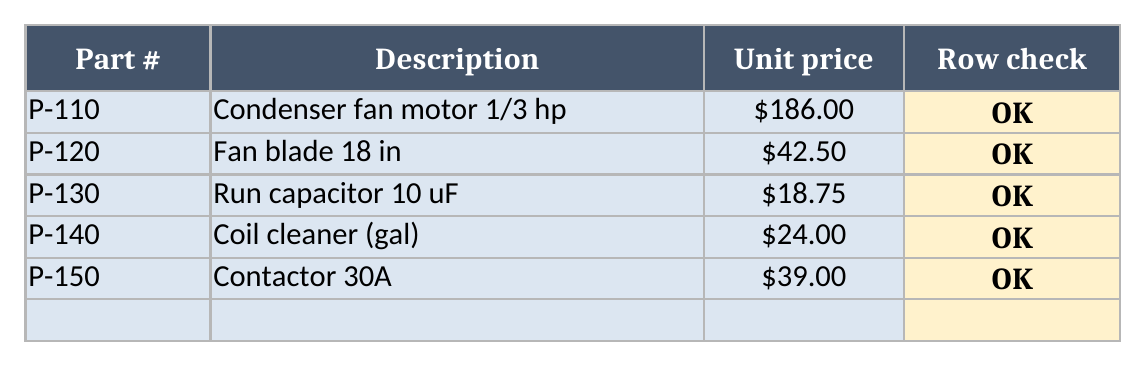
The sample visit uses three parts: a condenser fan motor at $186.00, a run capacitor at $18.75, and 2 gallons of coil cleaner at $48.00, for $252.75 in parts.
The lookup only fills in a line when exactly one catalog row has that part number. A part number that’s blank, missing from the catalog, or listed twice shows a dash for the description, and the line reads Check part. A quantity that’s blank, zero, negative, text or above 10,000 reads Check qty. Neither kind of line counts toward Parts. Matching is literal, so a stray * or ? in a part number won’t pull up a different part.
On Parts, Row check reads Check ID for a missing part number, Duplicate ID for a part number used twice, and Check inputs for a missing description or a price that isn’t a number from 0 up. A report line that points at a flagged catalog row reads Check part until you fix it.
Worked example: the sample report
The field service report sample is a walk-in cooler call at a grocery store on 2026-11-02, report SR-2026-1104. Every figure is a sample input to replace. The report works out:
| Line | Result |
|---|---|
| Hours on site | 3.5 |
| Labor | $332.50 |
| Parts | $252.75 |
| Trip charge | $65.00 |
| Subtotal | $650.25 |
| Tax on parts (8.0%) | $20.22 |
| Report total | $670.47 |
| Readings out of range | 2 |
| Rows to check | 0 |
Tax applies to parts only, so the 8.0% rate is charged on the $252.75 in parts and not on labor or the trip charge. Rows to check is 0, so the report total shows. The work performed box notes the seized fan motor, the coil cleaning and the damaged coil fins, and the recommendations box asks for a quote on a new condenser coil.
The blank report and sign-off
The Report sheet uses the same layout and formulas with nothing filled in. Its totals read 0 until you type a visit. The print area covers the whole report, from the header through the signature lines, and is set to fit one page.
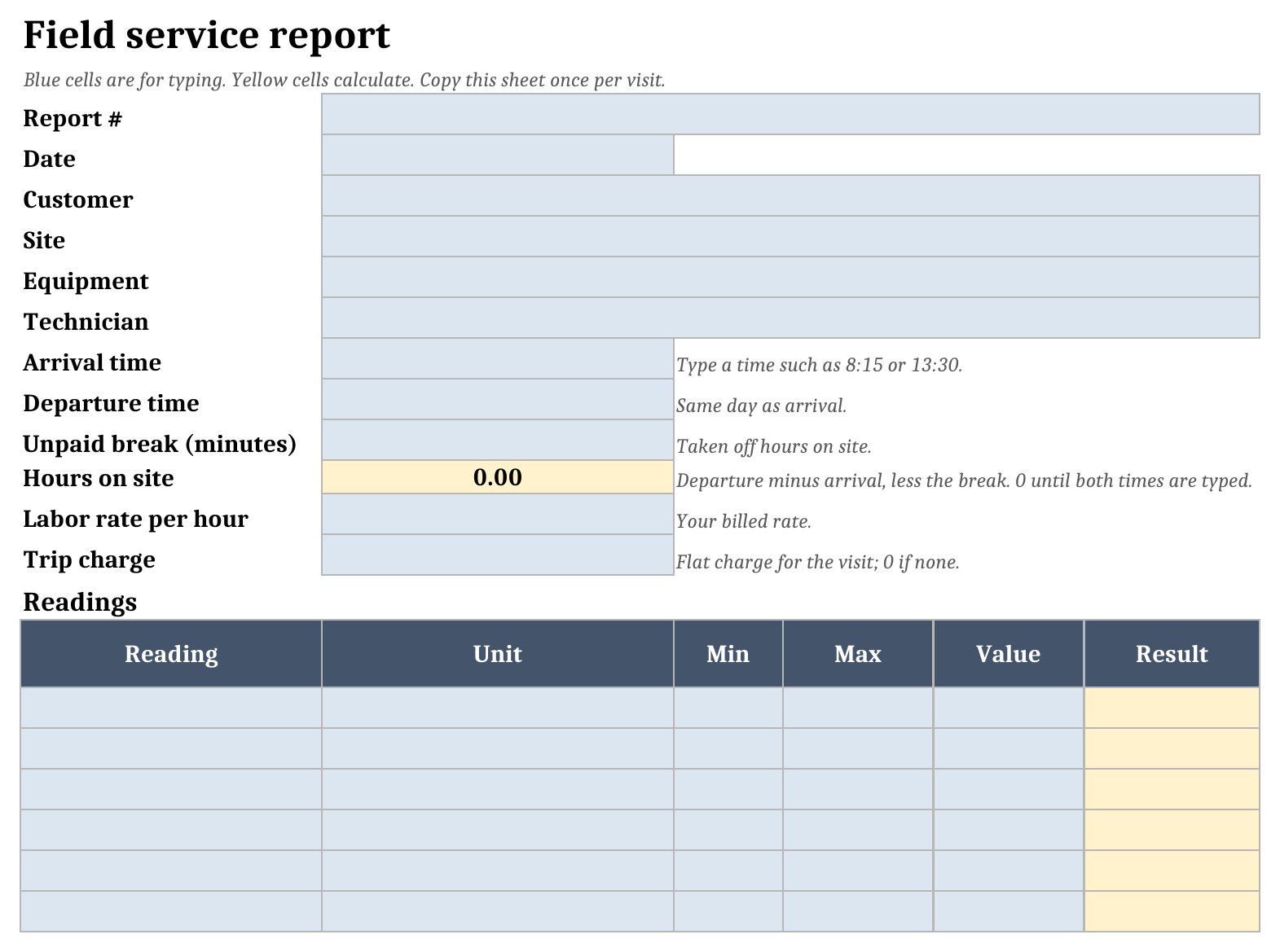
Below the totals there’s a box for the work performed and one for recommendations, then signature and date lines for the technician and the customer and a line for the customer’s printed name. Print the sheet, have both sign, and file the signed copy with the job.
Importing it into Google Sheets
To work in Google Sheets, import the .xlsx:
- Download the workbook from the template link.
- Open Google Sheets.
- Choose File > Import > Upload.
- Select the downloaded file.
- Choose Insert new sheet(s), or create a new spreadsheet from the upload.
- Check Report, Sample Report and Parts after the import.
There are no macros, but formatting and formulas can behave differently after import. Check the results, dropdowns and colors before you rely on the file or share it with your team.
How it fits with our other templates
A report is the last step of a visit, so it sits next to a few other records:
- The field service work order template holds the job before and during the visit: the customer, the problem, priority and status. The report records what the technician found and did once on site.
- The equipment maintenance log template keeps the history for each piece of equipment. After each visit, add a line there so repeat problems on the same unit show up.
- Our field service report guide covers what a good report should say and how to run reporting across a team.
You’ll find the rest of the set on our free field service templates page.
Limitations to know before relying on it
- Each report sheet is one visit on one day. A departure earlier than the arrival reads 0 hours.
- One labor rate applies to the whole visit, and tax applies to parts only.
- Each report holds six readings and eight part lines. The catalog holds 100 parts, in rows 2 to 101 of Parts.
- Rows to check on Sample Report also counts problems on the Parts sheet. On a blank Report copy it counts that report’s own readings and part lines, and a flagged catalog part shows up there as Check part.
- It’s a spreadsheet. It doesn’t take photos or electronic signatures, email the customer, or sync with the office.
Grab the field service report template, load your parts into the catalog, and fill in a report for your next visit.