

Our contractor estimate template prices a job the same way every time and gives the customer one page to sign. You keep your labor rate and markups for each trade in one place and list the job line by line. The workbook prices every line, adds tax on materials and sets good, better and best options side by side. Pick the option to present and the Estimate sheet prints it as a one-page customer estimate.
Download the contractor estimate template. It’s a plain .xlsx file with no macros and no sign-up. The sample job, rates and prices are placeholders, so replace them with your own.
Video walkthrough
This short captioned walkthrough covers the line items, the trade presets that price them, and the Estimate sheet with its three options.
Who this template is for
It’s for contractors and service companies who price jobs for homeowners and small businesses: HVAC, plumbing, electrical, roofing, painting, landscaping and similar trades. It fits a one-truck owner writing estimates at the kitchen table as well as an office manager who prepares them for several technicians.
It keeps the same labor rate and markups on every estimate, so you stop retyping them, and it builds good, better and best options from one job list instead of three separate estimates. The page the customer signs shows a total that matches the lines above it.
If you’re bidding commercial work to a general contractor or building owner, where you build up the full cost first and check your margin, our commercial HVAC bid template is the better fit.
What’s in the workbook
There are four sheets, in this order:
- Instructions covers setup, the color legend, import steps for other spreadsheet apps, the limitations, and a note that every formula, layout choice and sample figure was written from scratch for this file.
- Presets holds one row per trade: the trade name, your labor rate per hour, and your markup on materials, equipment and subcontracts.
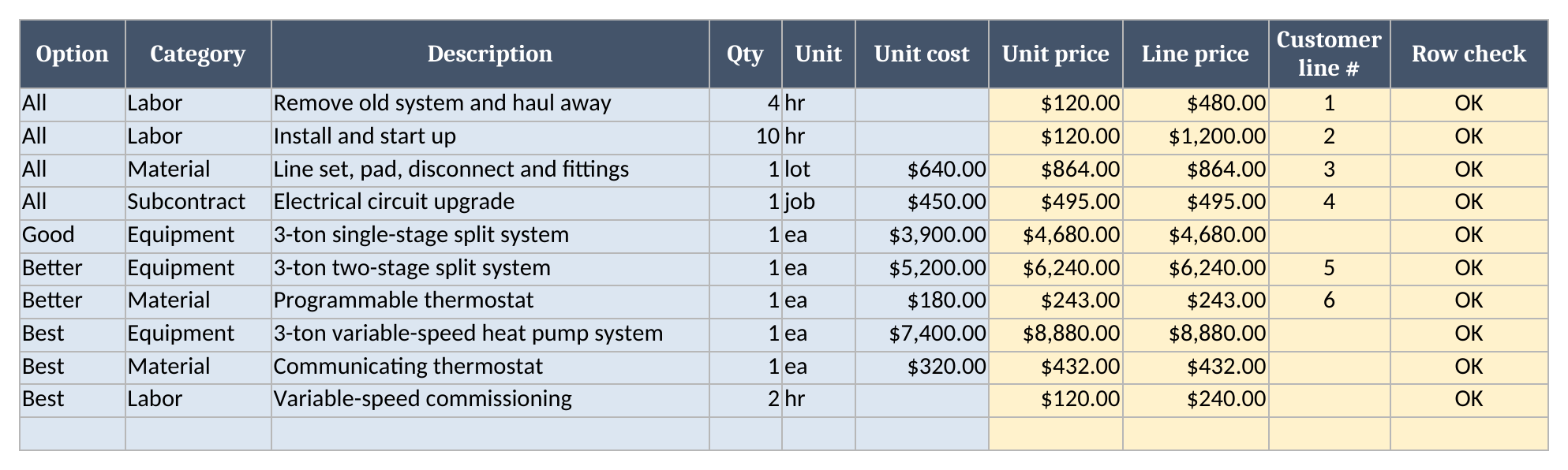
- Line Items lists the job, one row per line, with the option it belongs to, its category, description, quantity, unit and unit cost. The sheet works out the unit price, the line price and the line’s number on the customer sheet.
- Estimate is the customer-ready page: your company details, the customer and job, the option table, the lines for the option you present, the total, terms and signature lines.
Blue cells are for typing, yellow cells calculate, and green cells hold the totals.
How to fill it in
- If your spreadsheet app opens the file read-only, turn on editing so the formulas calculate.
- On Presets, replace the sample trades and rates with your own sell rate per hour and the markups you charge.
- On Line Items, list the job. Mark lines every option shares as All, and option-only lines as Good, Better or Best. Enter hours on Labor rows and a unit cost on every other row.
- On Estimate, fill in the customer, job address, estimate number, date and how many days the price holds. Pick the trade and enter your tax rate on materials.
- Compare the three options, then pick the one to present. Check that Rows to check reads 0, then print the Estimate sheet or save it as a PDF.
How the trade presets price each line
Every line is priced from the preset for the trade you pick on the Estimate. Labor lines take hours and are priced at the preset’s labor rate. In the sample, HVAC is set at $120.00 an hour, so 10 hours to install and start up the system comes to $1,200.00. Material, equipment and subcontract lines take your cost, and the workbook adds that category’s markup. The $864.00 line set and fittings line is the $640 sample cost plus the 35% material markup.
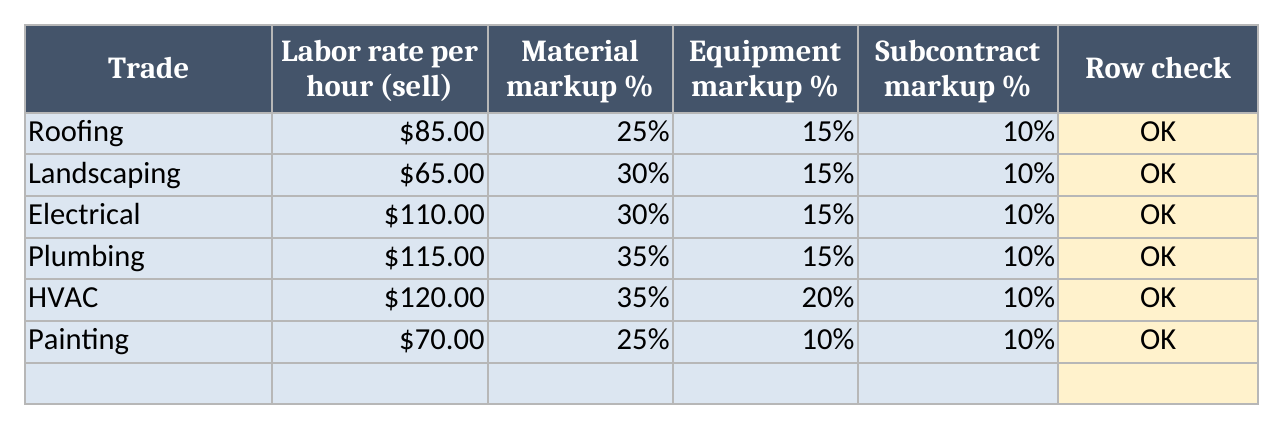
Switch the trade from HVAC to Plumbing and every line reprices from the Plumbing row. You don’t touch Line Items at all. One job list can be priced for a different crew or division, and a rate change on Presets reaches every open estimate in the file.
Treat the sample rates as placeholders. They show how the sheet behaves and aren’t typical rates for any trade. To work out a labor rate that covers wages, burden and overhead, start with our labor rate calculator and flat-rate price book. To check what a markup does to your margin, use the markup and margin calculator.
Good, better and best options
Each line on Line Items belongs to All or to one option. All lines go into every option. In the sample, that’s removing the old system, installation labor, the line set and fittings, and the electrical circuit upgrade. Option lines add on top: a single-stage system for Good, a two-stage system and programmable thermostat for Better, and a variable-speed heat pump, communicating thermostat and extra commissioning time for Best.
The option table on the Estimate shows all three at once, with the subtotal, tax on materials and total for each:
| Option | Subtotal | Tax on materials | Total |
|---|---|---|---|
| Good | $7,719.00 | $69.12 | $7,788.12 |
| Better | $9,522.00 | $88.56 | $9,610.56 |
| Best | $12,591.00 | $103.68 | $12,694.68 |
Tax applies only to Material lines, at the rate you enter. Equipment, labor and subcontract lines aren’t taxed. Rules differ by state and province, so check what your jurisdiction taxes and set the categories to match. Enter 0 for a tax-exempt job.
The customer estimate
Pick the option to present and the lines below the option table reprint for it. The sample presents Better, so the customer sheet lists 6 lines: the four All lines and the two Better lines, numbered in the order they appear on Line Items. The total for the option presented is $9,610.56, and the terms line repeats the valid-until date worked out from the estimate date and the days the price holds.
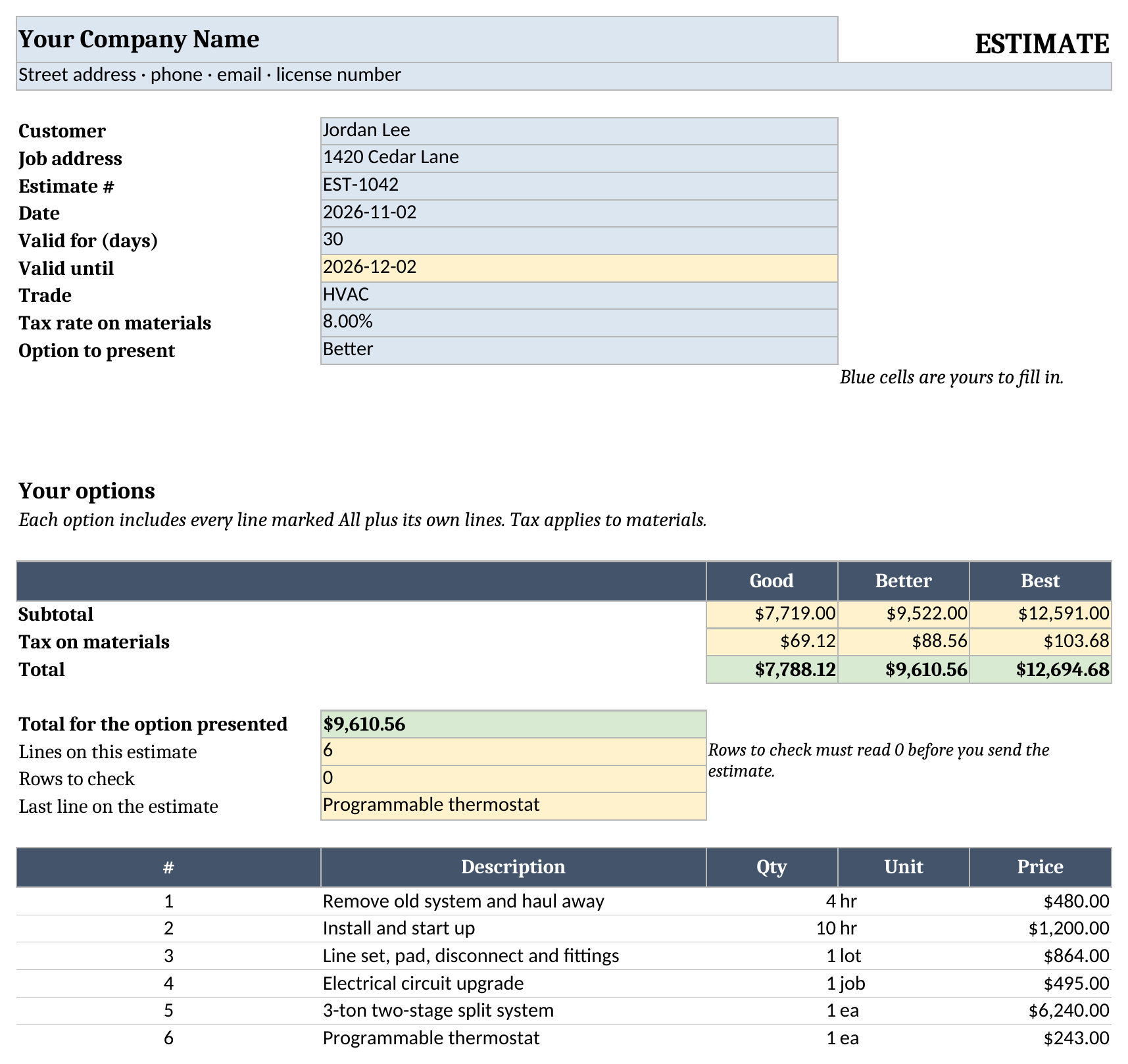
The Estimate prints on one page and shows up to 40 lines. An option with more than 40 lines reads “Over 40 lines” in the option table instead of a total, so the printed page never shows a total beside a cut-off list. Split a long job into fewer, larger lines, or estimate it in two parts.
The data checks
The workbook checks its inputs before it shows a price. Every Presets row ends with a Row check: Check ID for rates with no trade name, Duplicate ID when a trade appears twice, and Check inputs for a blank, text or negative rate or markup. Every Line Items row has one too. It flags an option or category that isn’t on the list, a blank, text or negative quantity, a cost that is text or negative, a Labor row with a unit cost, or any other row without one.
The Estimate adds them up in Rows to check, along with a trade that doesn’t match exactly one preset and a tax rate or validity period that is blank or negative. While Rows to check is above 0, every price reads “Check data” and the customer lines stay empty, so a typo never prints as a number. Trade names are matched exactly, so a misspelled name or one with an asterisk can’t pick up another trade’s rates.
Using it with other tools
Every price on the estimate comes from your preset rate and markups. The labor rate calculator and flat-rate price book works out the hourly rate, and the markup and margin calculator shows what each markup leaves you. For commercial work, use the commercial HVAC bid template. If you’re writing more estimates than a spreadsheet handles comfortably, our guide to the best estimating software for field service compares tools built for writing estimates. You can browse the rest of our free field service templates too.
Limitations
This is a pricing worksheet, not accounting or tax software. It applies one tax rate to the marked-up price of Material lines only. It doesn’t handle discounts, deposits, payment schedules or financing. Each option shows up to 40 lines on the customer sheet. Presets hold rows 2 to 21 and Line Items hold rows 2 to 201.
The workbook opens as a plain .xlsx file. Most spreadsheet apps can import it, and the Instructions sheet includes import steps.
Download the contractor estimate template and replace the sample rates and lines with your own.